Writing - technical
This guide explains how we write papers in a reproducible, collaboration-friendly way using Quarto. You edit the manuscript in paper.qmd (Quarto Markdown) and manage references in references.bib (CSL controls the citation style). Quarto renders the project to submission formats (PDF/DOCX/LaTeX), while Git tracks changes and supports collaboration (PRs, reviews, history). Most contributors only need two commands: quarto preview while writing, and quarto render for final output.
The paper development process is based on Quarto, Markdown, Git, Docker, Pandoc, and CSL. The goal is to support the collaborative writing process effectively, building on powerful open-source tools and facilitating the efficient production of documents for submission. Advantages of this workflow:
- Separation of content and format.
- Collaboration and versioning of text with Git.
- Relying on active open-source projects such as the CSL standard.
- Combined writing and comments in the same document.
- Reproducibility across platforms.
- Generating DOCX/TeX/PDF as output.
Since the underlying open-source projects (especially CSL, Pandoc, pandoc-citeproc) evolve constantly, it is recommended to work with the latest versions.
The paper template is based on the following underlying architectural principles and considerations:
- Minimal functionality: the most frequent use cases (writing, citing, creating submission files in DOCX/TeX/PDF format with different templates and citation styles) must be supported in a highly efficient way. More complex functionality (such as tables with merged cells and detailed formatting) is used less frequently, requiring less effort if not supported efficiently. It may also create fewer problems (e.g., merging complex tables, as in Word/comparisons of tables).
Setup
This section explains how to install the environment and build the paper. Quarto is required to preview a paper project. Copier is required to create a project from the template. Git, Docker, and Make are recommended. The following steps describe how to:
- Set up the repository (create a new one or contribute to an existing one),
- Edit the paper, and
- Build the paper.
The paper template creates the following files (additional files for the analysis can be added):
├── README.md     <- README containing summaries of the paper's revisions (completed
│                    and ongoing). Revision sheets are created from this document.
├── paper.qmd     <- Contains the paper
├── Makefile      <- Contains instructions to build the paper (as PDF or DOCX),
│                    and run the analyses (if a Makefile exists in the analysis
│                    directory)
├── Dockerfile    <- Describes the Pandoc container for building the paper
│                    (called by the Makefile)
├── literature    <- Directory containing literature summaries for Obsidian
├── figures       <- Directory containing all conceptual figures
├── output        <- Directory containing all output, such as data plots and
│                    tables, which is generated by the scripts (do not store
│                    anything else that is not generated by the scripts in this
│                    directory)
└── .gitignore    <- Contains a list of files that are excluded from Git
                     versioning (e.g., paper.pdf, which would create conflicts
                     when merging changes)
Templates (*.docx, *.tex) and styles (*.csl) are versioned in the paper repository. This can be accomplished by using the code in comments at the beginning of the Makefile.
Step 1: Set up the repository
Start your manuscript development by using the Quarto template. This template provides a structured format for your initial drafts, helping to organize content efficiently.
Option 1: Create a new repository
- Select a short and pronounceable title for the paper.
- Do not refer to papers by their target journal (e.g., “the Journal of Information Technology paper”).
- Create a project from our Quarto template with Copier:
copier copy --trust gh:fs-ise/quarto-template-paper my-paper
# Answer copier questions on paper metadata
cd my-paper

# Create a repository on GitHub, then connect and push it:
git remote add origin https://github.com/your-account/your-repository.git
git branch -M main
git push -u origin main
Option 2: Contribute to an existing repository
# pull repository
git clone git@github.com:fs-ise/...
pre-commit install
Step 2: Edit the paper
The paper.qmd is written in Markdown. There are three ways to edit a paper:
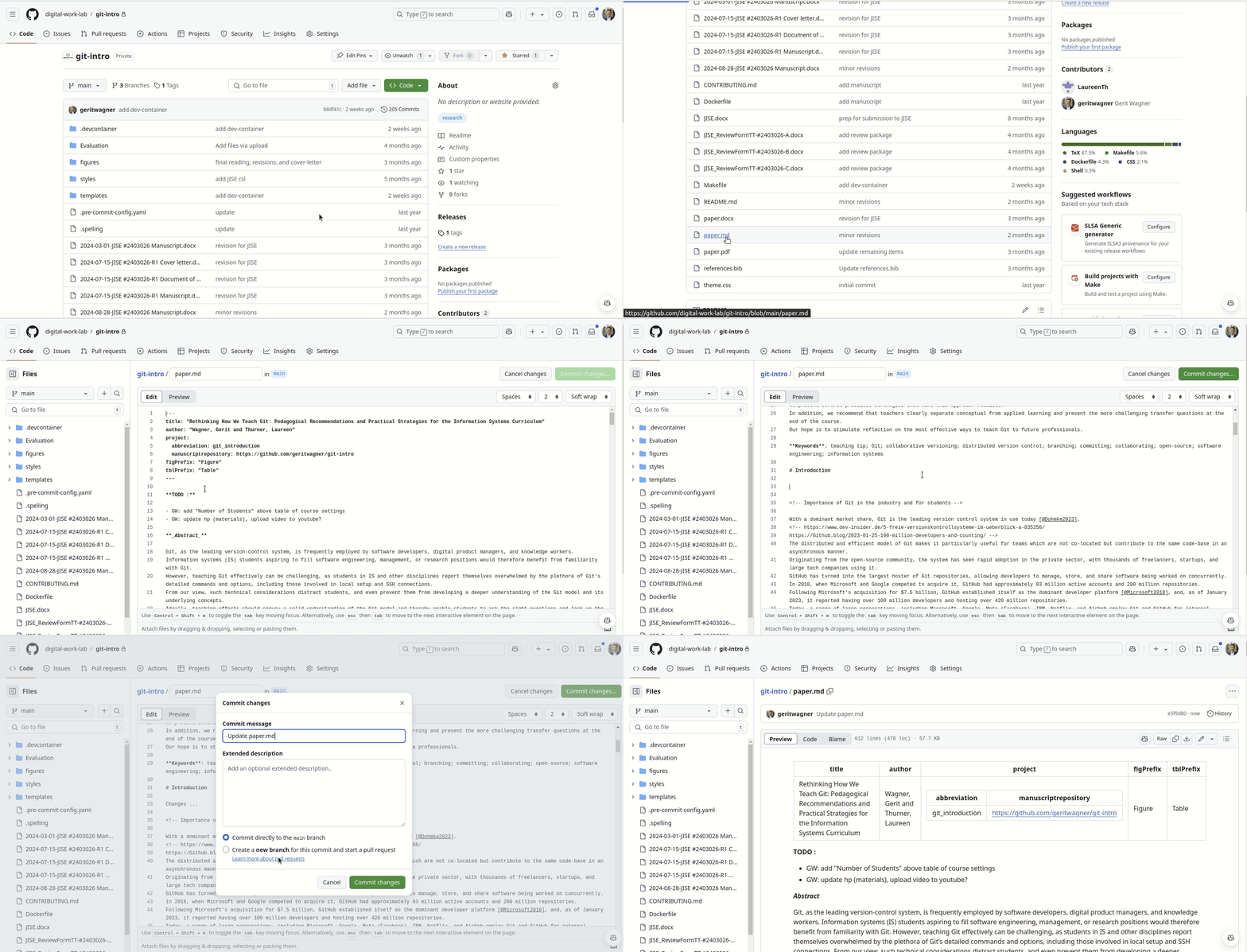
GitHub edit
- Does not support DOCX/TeX/PDF generation.
- Does not support commits changing multiple files.
- Requires an Internet connection.
- No setup required.
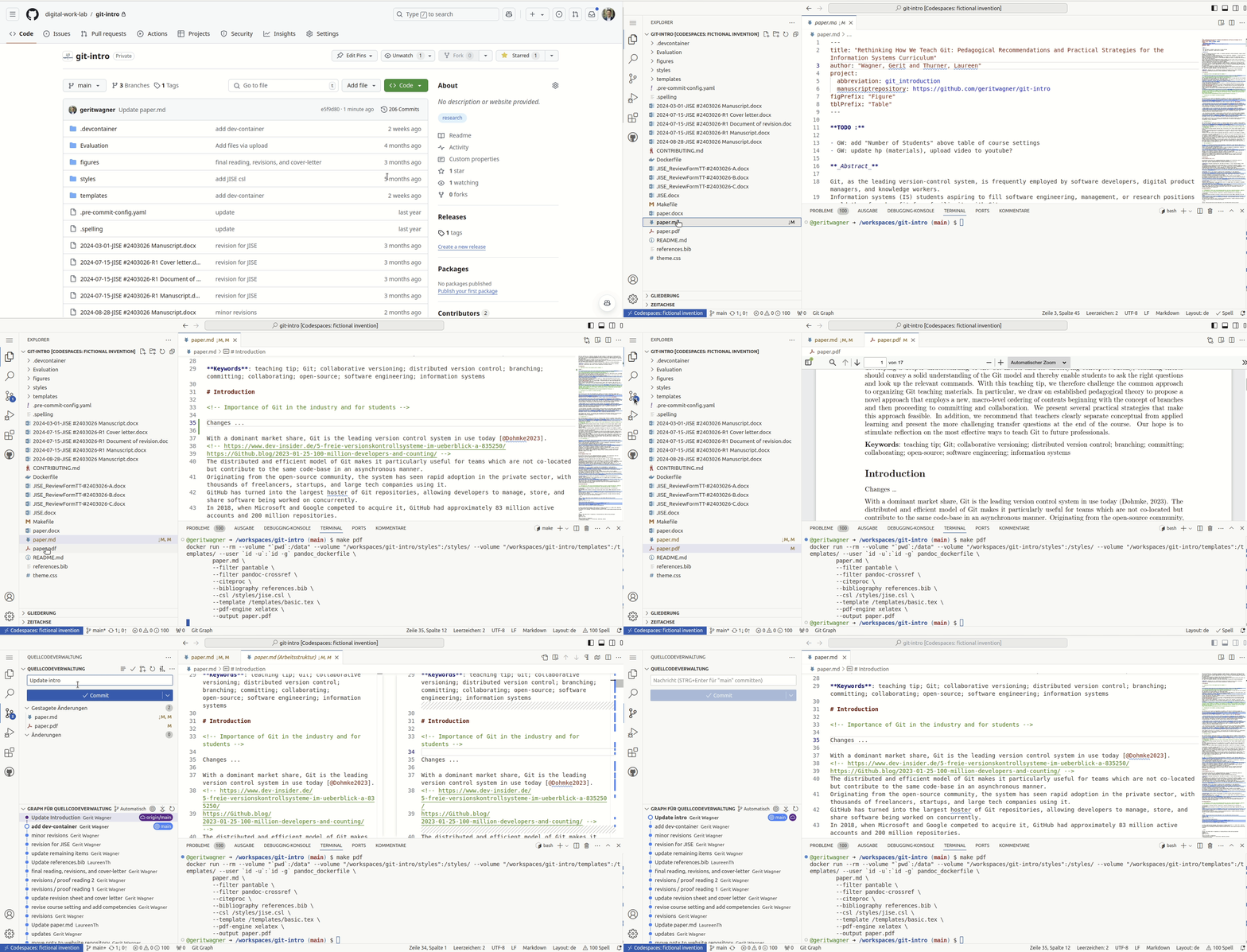
Codespace edit
- Supports DOCX/TeX/PDF generation.
- Supports all types of commits.
- Requires an Internet connection.
- No setup required.
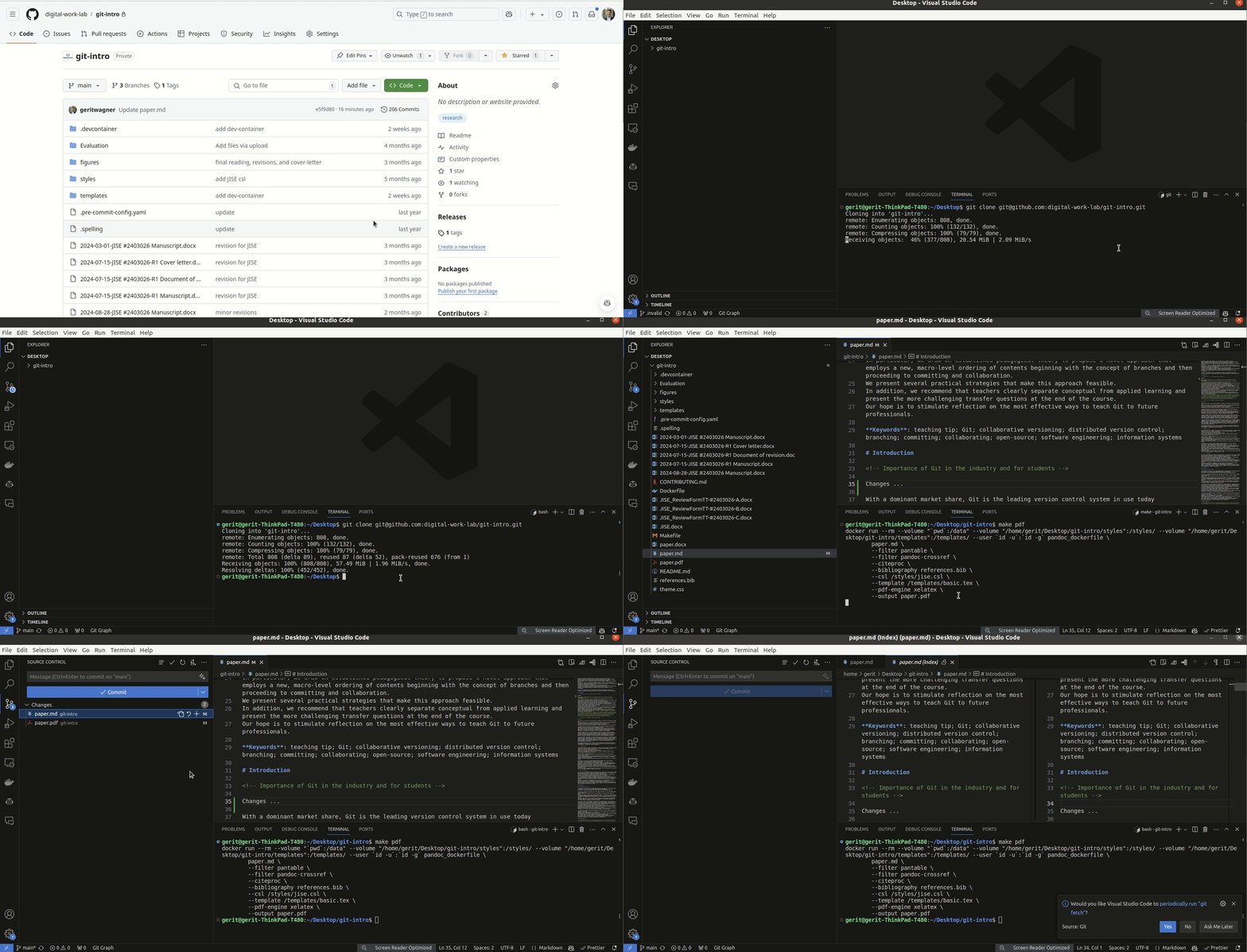
Local edit
- Supports DOCX/TeX/PDF generation.
- Supports all types of commits.
- Does not require an Internet connection.
- Requires some setup.
Step 3: Build the paper
quarto preview
# MANUALLY select a citation style by updating the link at the beginning of the Makefile
# MANUALLY select templates for DOCX/TeX/PDF by updating the link at the beginning of the Makefile- Citation styles can be selected here.
- Templates are available here.
- See Pandoc journal templates.
Markdown hints
Useful guides on Markdown are available online (1, 2).
It is good practice to:
- Begin each sentence on a new line to make the history more readable and to facilitate merging (see semantic line breaks).
Figures can be included as follows and referred to as @fig:distribution. Further information on pandoc-crossref is available online.
{#fig:distribution width=300px}
We show the findings in @fig:distribution.To ensure compatibility with Pandoc Word and LaTeX conversion, figures should be included as JPG/PNG. For the final versions, vector graphics (PDF, EMF) should be included for LaTeX/Word, respectively.
Formulas can be included as follows:
$$ P_i(x) = \sum_i a_i x^i $$ {#eq:eqn1}Tables can be created with GridTables (which is displayed in PDF and Word documents):
| fruit  | price  |
|:--------|:--------:|
| apple  | 2.05   |
| pear   | 1.37   |
| orange | 3.09   |

Table: Findings {#tbl-findings tbl-colwidths="[75,25]"}

We show the findings in @tbl-findings.

<!-- note: colons ":" below headings for alignment: left, center, ... -->
See Quarto tables and Markdown table editor.
Footnotes:
Text with a footnote [^1].

  [^1]: Example footnote.
Comments:
<!--
Comments can be used to add further explanations, links to references/resources,
or to keep parts of the paper that were shortened
-->
Information on references and citations is in the editing-markdown-paper section.
Literature summaries: Obsidian
Literature summaries for each paper are stored in Obsidian format in the literature directory.
Citations and reference sections
Citing allows us to make the results of others understandable and give proper recognition to the authors. There are two main reasons why we cite: firstly, to respect copyrighted works, and secondly, to adhere to the principles of good scientific practice by appropriately acknowledging the contributions of others.
To lookup metadata, online tools exist: BibGuru and ISBN-lookup.
The following examples use Markdown syntax (used by Pandoc converters and Quarto). The syntax is based on the citation syntax (see CSL). Further information on the citation syntax is available in the Pandoc manual.
To include citations:
- Add them to the references.
- Cite them in the text, and
- Generate the bibliography.
References (BibTeX file)
The bibliography is stored as a BibTeX file (typically references.bib) and versioned by Git.
Changes in the BibTeX file should be checked before committing.
References should be as complete as possible, including the relevant fields.
Each reference should be listed once (not multiple times).
Examples with relevant fields are summarized below.
Journal articles
@article{LeeAnderson2001,
    doi                = {10.1006/COGP.2000.0747},
    author             = {Anderson, John R},
    journal            = {Cognitive Psychology},
    title              = {Does learning a complex task},
    year               = {2001},
    volume             = {42},
    number             = {3},
    pages              = {267--316},
}- Conference papers
@inproceedings{LeeAnderson2001,
    author             = {Weber, Matthias and Remus, Ulrich and Pregenzer, Michael},
    booktitle          = {Proceedings of the International Conference on Information Systems},
    title              = {A new era of control: Understanding algorithmic control in the gig economy},
    year               = {2022},
}- Books:
@book{Kolb2014,
    author             = {Kolb, David A},
    title              = {Experiential learning},
    year               = {2014},
    publisher          = {FT Press},
}- Essays in collected editions:
@incollection{Anderson1984a,
    author             = {Anderson, Richard C},
    booktitle          = {Theoretical models},
    title              = {Role of the reader's schema in comprehension, learning, and memory},
    year               = {2018},
    pages              = {136--145},
    publisher          = {Routledge},
}- Websites
@online{Microsoft2018,
    author             = {Microsoft News Center},
    title              = {Microsoft to acquire GitHub for $7.5 billion},
    year               = {2018},
    url                = {https://news.microsoft.com/2018/06/04/microsoft-to-acquire-github-for-7-5-billion/},
}
In-text citations
In-text citations can be parenthetical or narrative (see APA style). Word-for-word quotations (parenthetical or narrative) must be identified by quotation marks, and a page number must be given. Parenthetical citations tend to be preferred over narrative citations because they put more emphasis on the content, concepts, or findings instead of the authors.
The following example illustrates the citation syntax of Markdown (or the Pandoc converters used by Quarto) (link). The unique IDs (e.g., SmithEtAl2006) are used to link citations to the corresponding elements in the BibTeX file.
<!-- Example *parenthetical* citation: -->

Fitness trackers were found to have mixed effects on sedentary behavior [@SmithEtAl2006].

<!-- Example *narrative* citation: -->

@SmithEtAl2006 analyzed the effectiveness of fitness trackers.

<!-- Example *word-for-word quotation*: -->

For fitness trackers, "measures of sleep quality are inaccurate" [@SmithEtAl2006, p. 111].
When rendered with Quarto and the APA citation style, this will be displayed as:
Fitness trackers were found to have mixed effects on sedentary behavior (Smith et al. 2006).
Smith et al. (2006) analyzed the effectiveness of fitness trackers.
For fitness trackers, “measures of sleep quality are inaccurate” (Smith et al. 2006, p. 111).
Fields
ENTRYTYPEset correctly (e.g., “article” or “inproceedings”).authorformatted correctly (Wagner, G. and Prester, J.).titlecomplete and in sentence case (e.g., “On the origin of species,” not “On the Origin of Species”).journalfield complete and in title case (e.g., “Journal of Information Technology,” not “JIT”).volume,number,pages,doifields added.
To update references based on Crossref, the colrev-sync package can be used:
colrev-sync syncNotes
- Groups of in-text citations should be sorted alphabetically (especially if a prefix is used), i.e., use
[e.g., @Bacharach1989; @Gregor2006a]instead of[e.g., @Gregor2006a; @Bacharach1989]. - Add
{}to protect cases when necessary (e.g.,{J}ab{R}ef) because CSL styles that require title case will use an automatic title-case conversion (1). - To cite software, datasets, and other artifacts, CiteAs is useful.
- Journal fields: Some CSL styles require abbreviations. Temporarily replace the journal field in the BibTeX file since CSL does not handle style-specific journal abbreviations (1). JSON files containing journal abbreviations can be passed to Pandoc using the citation-abbreviations field.
Bibliography
In a Markdown document, the bibliography (also known as the references section) is created automatically based on the BibTeX file and CSL specified in the YAML header. The nocite field can be used to add references that are cited in figures/tables but not in the text.
---
title: "Writing"
bibliography: path_to_/references.bib
csl: path_to/apa.csl
nocite: |
  @Davis1989
  @LangePfarrer2017
  @StrunkWhite1999
  @WebsterWatson2002
---

... text with citations

# References

<!-- References will be generated in the specified CSL style after this heading. -->For DOCX formats, use a reference manager plugin (such as Zotero). The reference manager should support the standardized citation styles of CSL.
Conceptual illustrations and plots
For conceptual illustrations, PowerPoint is currently recommended.
- Ensure alignment, etc.
- For PDF submissions, extract it as PDF (vector graphic with embedded text).
- For Word submissions, extract it as EMF (vector graphic with embedded text).
To plot findings, the R package ggplot2 is recommended. ggplot2 is a powerful library and allows us to automatically update the figures when the findings change.
It is possible to edit ggplot2 plots with LLMs (e.g., ChatGPT).
- Books: Bookdown project.
- Possible extensions (Lua filters): bibexport, abstract-to-meta, spellcheck, wordcount.
https://github.com/kapsner/authors-block https://github.com/jmgirard/embedpdf https://github.com/andrewheiss/quarto-wordcount