flowchart

  subgraph AFTER_BREAK["<b>After break: pandas and data files</b>"]
    direction TB
    B1["<b>pandas and imports</b> (15 min)"]
    B2["<b>Read and inspect Excel data</b> (20 min) · Bikesales.xlsx"]
    B3["<b>File paths and CSV input</b> (15 min)"]
    B4["<b>Load, preview, and export data</b> (15 min) · Exped.xlsx"]
    B5["<b>DataFrame indexes</b> (10 min)"]
    B6["<b>💻 Exercise: Countries and insurance import/export</b> (15 min) · Unfinished work for homework"]
    B1 --> B2 --> B3 --> B4 --> B5 --> B6
  end

  subgraph BEFORE_BREAK["<b>Before break: Python foundations</b>"]
    direction TB
    A1["<b>Python, libraries, scripts, and Spyder</b> (15 min)"]
    A2["<b>Demo: first Python script</b> (15 min) · Spydertest.py"]
    A3["<b>Arithmetic, strings, and variables</b> (20 min)"]
    A4["<b>Memory, print(), and program output</b> (15 min)"]
    A5["<b>💻 Exercise: Circle area and future value</b> (25 min)"]
    A1 --> A2 --> A3 --> A4 --> A5
  end
Session 04/Python 1: Python and pandas basics
NotePreparation
- Install Spyder on the machine and run
Spydersetup.py(Note: students already completedSpydersetup.pyin the setup sessions!) - Before the pandas exercises, introduce the
data.ziparchive available in Canvas. Confirm that students have extracted its datasets into adata/folder. - Transfer files to laptop/open environment
- Create a reminder to inform tutors about the exercises that we completed and those that should be discussed in the tutoring sessions
- Open PPTX for animations
- Inform students about recent materials (e.g., List of relevant Excel functions; Mock exam solutions)
If Python does not work on student machines, a solution may be to use
https://peter-rossbach.github.io/Python-Werkstatt/:

For Anaconda: See Canvas instructions:
Installing Anaconda for Python_Windows.pdfInstalling Anaconda for Python_Mac.pdf
Install packages using Anaconda
Use this sequence in Anaconda PowerShell Prompt:
# 1. Show environments
conda info --envs

# 2. Activate the environment used by Spyder
conda activate <environment-name>

# 3. Install the package
conda install <package-name>

# Example
conda activate mlbd
conda install inquirer
Then restart the Spyder kernel/IDE so it picks up the installed package.
Slide 1 - Introductory discussion
- Discuss why Python complements Excel for advanced analytics, regression, prediction, machine learning, and AI.
- Contrast interpreted and compiled languages.
- Motivate Python through reusable libraries and the “don’t repeat yourself” principle. Don’t repeat yourself principle of programming: by using Python libraries (modularization of code), we benefit from the code written by others. Illustration (whiteboard): the Python code that is involved in a typical ML study is roughly 2 million LOC. 99.99% is imported (Pandas, scikitlearn, …) and a few hundred LOC are our code (tip of the iceberg, we orchestrate existing libraries). For the sake of the argument, we simply ignore all of the other code, the Python core or the code that runs the OS and operates the hardware. It is not just LOC, but the 99% of the code (the libraries) are often very well designed and maintained (if you pick the right libraries). Also, they are constantly updated so we get performance improvements, remaining bugs are fixed, and the documentation gets better. This means we can really “stand on the shoulders of giants”. Pretty amazing.
- On the whiteboard, illustrate an ML study as a small amount of course code built on a much larger body of imported, maintained library code. Emphasize that students orchestrate existing libraries and can “stand on the shoulders of giants.”
Show PyPI website; pandas project (popularity, commits, develoeprs, tests)
Slides 2-4 - Shell, Scripts, IDE
Explain spyder interface:
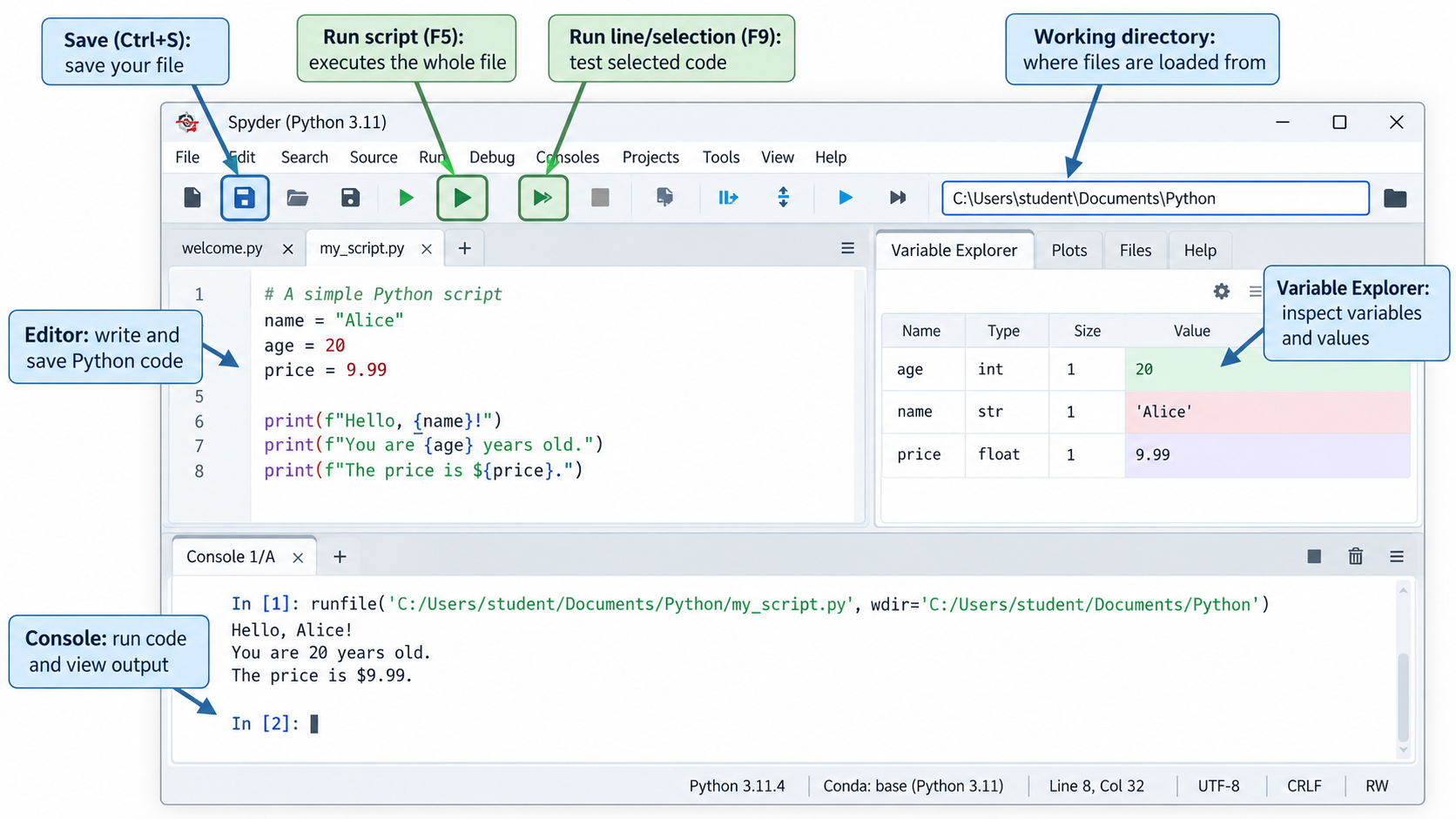
NoteSpyder working directory
For the exercises, work from the materials/ directory and keep this as Spyder’s current working directory.
Spyder may otherwise change the working directory when running a script (especially an unsaved script). To prevent this, open Tools → Preferences → Run and configure the working directory to use the current working directory, rather than the directory of the file being executed.
WarningDo not work on environment setup in the session
If it does not work for some students, ask them to work together with someone where it works. Setup was supposed to be completed in the first sessions.
Quick Walk through: spytertest.py (Canvas) at the start of the session
##########################
# Testprogram for Spyder #
##########################

print("This is a program to test the functionality of Spyder for the module 'Introduction to Programming'.")
print("Please click with the mouse after the colon (:) in this line, then type your first name and press enter: ")
name = input()
print("you have entered:", name)

print("If you see the name typed in press Enter to continue")
input()

import pandas as pd

data = {'Number': [1, 10, 10, 7],
        'Name': ['Manuel Neuer', 'Toni Kroos', 'Lionel Messi', 'Cristiano Ronaldo'],
        'Position': ['Goalkeeper', 'Midfielder', 'Forward', 'Striker'],
        'Goals': [0, 14, 30, 26]}
df = pd.DataFrame(data)
print(df)
print("Above, you should see a table with some data about the football players. Press Enter to continue")
input()

stockdata = pd.read_csv('https://www.alphavantage.co/query?function=TIME_SERIES_DAILY&symbol=IBM&apikey=demo&datatype=csv')
print(stockdata.head())
print("Above, you should see a table with some stock data. Press Enter to continue")
input()

import requests
r = requests.get('https://www.alphavantage.co/query?function=GLOBAL_QUOTE&symbol=IBM&apikey=demo')
data = r.json()
print(data)
print("Above, you should see a some more stock data enclosed in curly brackets. Press Enter to continue")
input()

stockdata.plot(y='close', use_index=True)
print("If you click on the plots tab at the bottom of the upper right window, you should see a line chart.")
Slide 5 — Basic arithmetic and string operations
Run these expressions individually in Spyder so that each result is visible.
3*5
16-5
16/4
16/5
16%5              # modulo/remainder after integer division (1)
16//5             # floor division: returns whole-number qotient (3)
3**2              # exponent
"Hello " + "World"
Note: operators explained on the following slide.
Slide 8 — Variables and reassignment
Refer to a variable as names bound to an object
Python allows a variable to be reassigned to values of different types (dynamic typing), while multiple assignment sets several variables in one statement.
x = 4
x

x = 3.12
x

x = 'hello'
x

a, b = 1, 2
a
b
a + b
Highlight multiplication between a string and an integer:
print("haha" * 4)Use an example with a = 54 to explain that strings and integers cannot be concatenated directly without conversion:
a = 54
print("This number is " + a)         # throws an error
print("This number is " + str(a))    # solution: explicit type conversion
Slide 9 - Variable memory and CPU
Explain step by step how Python approaches this statement.
- Assignment: right side to the variable z.
- Right side is a complex statement. Needs to be evaluated first….
Slide 10 — Output with print()
Tip
Point students towards the tooltips provided in Spyder when typing print( in editor or console. Read and try parameters end, sep. Then point to the slides.
These examples contrast comma-separated output and string concatenation, demonstrate repetition, use str() for conversion, and use end to control the line ending.
print('hello')
print('hello', 'there')
print('hello' + ' ' + 'there')
print('haha' * 4)
print(5 * 4)

a = 54
print(a)
print('The number is ' + str(a) + '!')
print('The number is', a, '!')

print('hello ')
print('Peter')
print('hello', end=' ')
print('Peter')
Slide 11 — Predicting program output
Predict the result of each block before running it.
x = 15
x = x + 5
print(x)20Note: for the x = x + 5, the slide 12 provides an animated explanation.
x = 4
y = x + 1
x = 2
print(x, y)
2 5a = 4.5
b = 2
print(a // b)2.0Note: Floor division returns the largest integer less than or equal to the result.
x = 17 / 2 % 2 * 3**3
print(x)13.5Note: Python evaluates according to operator precedence (like in mathematics): first, exponent (**), then the others left-to-right (they have the same precedence). Illustrate this by iteratively replacing results and verifying whether the result stays the same.
Example of a multiple assignment:
x, y = 2, 6
x, y = y, x + 2
print(x, y)
6 4a, b = 2, 3
c, b = a, c + 1
print(a, b, c)The final block intentionally raises a NameError because c is read before it has been assigned.
TipImportant learning
Multiple assignments retrieve variables and complete calculations simultaneously. There is a difference between the two:
c, b = a, c+1
# and
c = a
b = c+1
# The second will not raise an error!
Slide 13 — Basic formula programs
radius = 20
area = 3.14159 * radius**2
print ('The area of the circle with radius', radius, 'is:', area)investment = 1000
interest_rate = 0.06
investment_period = 5
future_value = investment * (1 + interest_rate)**investment_period
print("The future value is:", future_value)
WarningTypical error
future_value = investment(...)**...
# leaving out "*" raises an int not callable.
# patterns like `name()` are interpreted as function calls (like `print()`)
Break — 10 minutes
ImportantStudent errors
In this part, students typicall need assistance in setting up the working directory.
- Clarify expectation: this takes time, we will do it together
- Give a clear example (my directory, store all files and scripts, how to select it as the working directory in Spyder)
- Script must be stored in the working directory (check/compare!), otherwise, Spyder will automatically set the working directory to the directory of the script
- Ask students to help each other
- Announce the exercise (p.22) early, explain
data.head(), etc., and be available to help with setup afterwards. - Praise for perseverence
Slide 15 — Importing pandas
Pandas is already installed. We verified it in the spyder setup script.
pandas DataFrames are widely used to load, inspect, clean, and prepare tabular data for machine learning. Models commonly receive DataFrames (or similar formats) depending on the library.
The short alias pd is the conventional name used for pandas (programmers are often lazy and prefer short names).
import pandas as pdSlide 16 — Reading an Excel file into a DataFrame
ImportantRequired datasets
Download data.zip from Canvas and extract its files into a data/ folder. The archive contains Bikesales.csv, Bikesales.xlsx, Exped.xlsx, and Sales.xlsx.
The Bikesales.xlsx file used below is provided in Canvas as part of data.zip.
The final expression displays the DataFrame in an interactive environment.
data = pd.read_excel("data/Bikesales.xlsx")
data
Slide 18 — Working directory and file paths
ImportantWorking directory
During classroom demonstrations, the instructor selects the repository’s materials/ directory as the working directory in Spyder. A relative file path is interpreted relative to the current working directory, which can be selected in Spyder and is not necessarily the directory containing the Python script currently open in the editor.
Students should select their own working directory—for example, the folder containing their downloaded course materials—and adapt relative paths to their own folder structure. If they reproduce the course folder structure and select its parent materials/ directory, the example paths work without modification. They should not copy an instructor-specific absolute path.
Show how to create a working directory in Explorer/Finder, select it in Spyder, store the script in the same directory and access the file using pandas:
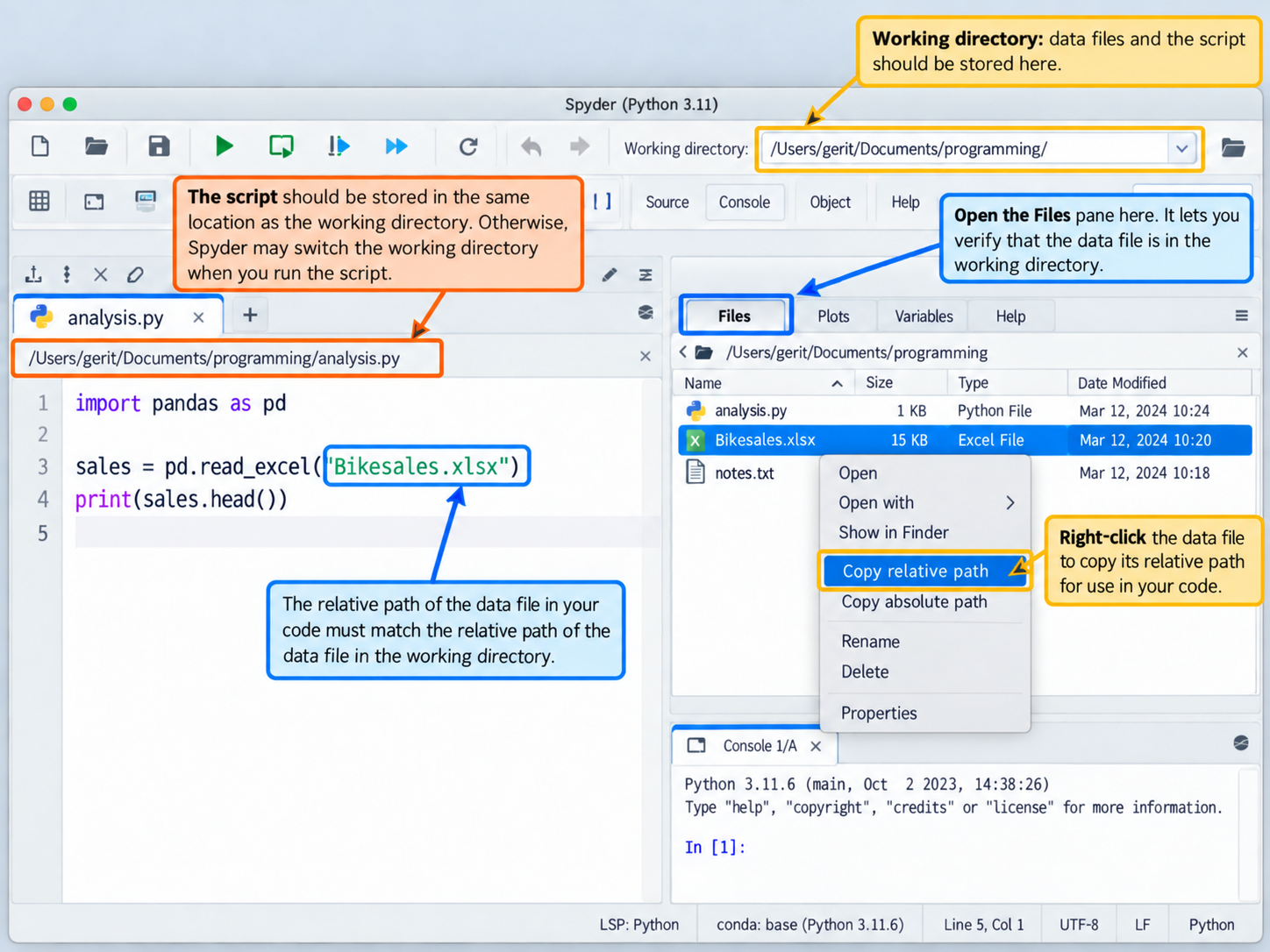
Check the active working directory with:
import os
print(os.getcwd())
ImportantWorking directory: OS Errors
Windows: The raw-string prefix r prevents backslashes from being interpreted as escape sequences:
os.chdir(r'D:\Dropbox\Lehre\Introduction to Programming\Presentation')MacOS:
- In Finder, use
option+command+pto access the path (oroption+command+cto copy it^). - Finder → View → Show Path Bar
Slide 17 — Inspecting a DataFrame
These expressions show the DataFrame dimensions, column names, and column data types.
data.shape
list(data)
data.dtypes
Slide 19 — Reading CSV files
The relative path is resolved against the active working directory. Bikesales.csv is in the archive’s data/ folder.
data = pd.read_csv("data/Bikesales.csv")Slide 20 — Loading, previewing, and exporting data
Exped.xlsx is included in the Canvas data.zip archive. head() previews the first rows; index=False avoids writing the DataFrame index as an extra CSV column. Generated files go in outputs/, separate from input data.
import os

exped = pd.read_excel("data/Exped.xlsx")
exped.head()

exped.to_csv("outputs/Exped.csv", index=False)
Slide 21 — Setting a DataFrame index
After set_index(), Transid supplies the row labels.
exped1 = exped
exped1 = exped1.set_index('Transid')
exped1.head()
Slide 22 — Importing and exporting data
import pandas as pd

countries = pd.read_csv('data/countries.csv')
print(countries.shape)
countries.head()
print(countries.columns) # or print(list(countries))
Exercise
import pandas as pd

insurance = pd.read_excel('data/insurance.xlsx')
print(insurance.shape)
print(insurance.head())
print(list(insurance))
insurance.to_csv('outputs/insurance.csv', index=False)- Complete all exercises as time permits.
- If time is short, assign unfinished exercises as homework.
- Python solutions will be discussed by the tutors.
Summary and announcements
TipNotes for improvement
Take notes on improvements and common questions during the session and add them to feedback.qmd afterwards.