
Prof. Dr. Gerit Wagner
(2026-03-30)
In this session, we follow the CRISP-DM process:

Housing markets represent one of the largest asset classes in most economies. Residential real estate accounts for a substantial share of household wealth, and even small pricing errors can translate into large financial consequences.
Understanding what drives house prices is therefore relevant for:
How could we use analytical models, such as regression models, to understand the drivers of prices?
To answer our question, we need a dataset that includes:
To address this, we turn to a publicly available dataset on Kaggle: the Ames Housing dataset, which provides detailed information on residential properties and their sale prices.
About Kaggle
Kaggle is a popular data science platform offering:
As a first step, we retrieve the dataset and load it into our Python environment for analysis.
| Order | PID | area | price | MS.SubClass | MS.Zoning | Lot.Frontage | Lot.Area | Street | Alley | ... | Screen.Porch | Pool.Area | Pool.QC | Fence | Misc.Feature | Misc.Val | Mo.Sold | Yr.Sold | Sale.Type | Sale.Condition | |
|---|---|---|---|---|---|---|---|---|---|---|---|---|---|---|---|---|---|---|---|---|---|
| 0 | 1 | 526301100 | 1656 | 215000 | 20 | RL | 141.0 | 31770 | Pave | NaN | ... | 0 | 0 | NaN | NaN | NaN | 0 | 5 | 2010 | WD | Normal |
| 1 | 2 | 526350040 | 896 | 105000 | 20 | RH | 80.0 | 11622 | Pave | NaN | ... | 120 | 0 | NaN | MnPrv | NaN | 0 | 6 | 2010 | WD | Normal |
| 2 | 3 | 526351010 | 1329 | 172000 | 20 | RL | 81.0 | 14267 | Pave | NaN | ... | 0 | 0 | NaN | NaN | Gar2 | 12500 | 6 | 2010 | WD | Normal |
| 3 | 4 | 526353030 | 2110 | 244000 | 20 | RL | 93.0 | 11160 | Pave | NaN | ... | 0 | 0 | NaN | NaN | NaN | 0 | 4 | 2010 | WD | Normal |
| 4 | 5 | 527105010 | 1629 | 189900 | 60 | RL | 74.0 | 13830 | Pave | NaN | ... | 0 | 0 | NaN | MnPrv | NaN | 0 | 3 | 2010 | WD | Normal |
5 rows × 82 columns
An important step is to understand the meaning of the variables—that is, what each column represents and how the data was collected.
To understand the variables, we consult the dataset documentation and create a structured overview.
We create a small table that summarizes key variables:
| Variable | Meaning | Unit / Values | Notes |
|---|---|---|---|
Order |
Unique order number | — | Check for duplicates, NA not allowed |
PID |
Parcel identification number | — | Same property can appear multiple times (e.g., repeated sales) |
area |
Above-ground living area | Square feet | Check for plausible ranges and consistency |
price |
Sale price of the property (target variable) | USD | Check format, missing values, and outliers |
MS.SubClass |
Type of dwelling | Categorical codes (e.g., 020, 060) | Retrieve code definitions and check consistency with other variables |
MS.Zoning |
General zoning classification | Categorical (e.g., RL, RM, FV) | TODO: Understand categories (may require external expertise) |
... |
Additional variables (e.g., lot size, street type) | — | … |
this step often involves acquiring access to data, extracting it from systems, consulting documentation, talking to domain experts, and making sense of how the data was collected and defined.
Before estimating a regression model, we first prepare and explore the data. Key steps include:
Check data quality
Format and transform variables
Explore relationships
Note
These steps were covered in detail in the data preparation lecture. Here, we focus on the analytical modeling.
1. Specify prediction task
2. Collect candidate models (selective overview)
| Model family (examples) | Strengths | Limitations |
|---|---|---|
| Regression models (Linear, Ridge, Lasso) | Interpretable, simple, well understood | Limited prediction performance, few predictors |
| Clustering (e.g., k-means) | Identifies structure in data | Not designed for prediction tasks |
| Machine learning models (e.g., Neural Networks) | Strong predictive performance, flexible | Less interpretable, require tuning, can overfit |
3. Select model
4. Test and compare
→ Start with a simple, interpretable baseline (e.g., linear regression)
→ Then implement more complex models for comparison
Model formula: \[price = \beta_0 + \beta_1*squarefoot\]
n = 40

mulberry32 = (a) => () => {
  a |= 0; a = a + 0x6D2B79F5 | 0
  let t = Math.imul(a ^ a >>> 15, 1 | a)
  t = t + Math.imul(t ^ t >>> 7, 61 | t) ^ t
  return ((t ^ t >>> 14) >>> 0) / 4294967296
}
rand = mulberry32(12345)

data = Array.from({length: n}, () => {
  const squarefoot = 500 + rand() * 3000
  const noise = (rand() - 0.5) * 100000
  const price = 50000 + squarefoot * 180 + noise
  return {squarefoot, price}
})

xmin = Math.min(...data.map(d => d.squarefoot))
xmax = Math.max(...data.map(d => d.squarefoot))

fitLine = [
  { squarefoot: xmin, price: beta0 + beta1 * xmin },
  { squarefoot: xmax, price: beta0 + beta1 * xmax }
]Visualization
viewof combinedSliders = {
  const b0 = Inputs.range([0, 300000], {value: 50000, step: 5000, label: "β₀ (base price)"})
  const b1 = Inputs.range([50, 400], {value: 180, step: 5, label: "β₁ (price per sq ft)"})
  const div = html`<div style="display:flex; gap:2rem; align-items:center;">${b0}${b1}</div>`
  div.value = {beta0: b0.value, beta1: b1.value}
  b0.addEventListener("input", () => {
    div.value = {beta0: b0.value, beta1: b1.value}
    div.dispatchEvent(new Event("input"))
  })
  b1.addEventListener("input", () => {
    div.value = {beta0: b0.value, beta1: b1.value}
    div.dispatchEvent(new Event("input"))
  })
  return div
}

beta0 = combinedSliders.beta0
beta1 = combinedSliders.beta1Plot.plot({
height: 480,
marginLeft: 70,
grid: true,
x: { label: "squarefoot" },
y: {
label: "price ($)",
domain: [0, Math.max(...data.map(d => d.price)) * 1.1]
},
marks: [
Plot.dot(data, {x: "squarefoot", y: "price", r: 3}),
Plot.line(fitLine, {x: "squarefoot", y: "price", stroke: "crimson", strokeWidth: 3})
]
})exampleData = [
{squarefoot: 800, price: 196000},
{squarefoot: 1200, price: 272000},
{squarefoot: 1500, price: 322000},
{squarefoot: 1900, price: 394000},
{squarefoot: 2300, price: 466000},
{squarefoot: 2700, price: 538000},
]
exampleFit = [
{squarefoot: 800, price: 50000 + 180 * 800},
{squarefoot: 2700, price: 50000 + 180 * 2700}
]The model
\[\hat{y} = \beta_0 + \beta_1 \cdot x\]
\[\hat{\text{price}} = 50{,}000 + 180 \cdot \text{squarefoot}\]
Prediction
Example: How much would a 1,500 sq ft house cost?
\[\hat{price} = 50{,}000 + 180 \times 1{,}500 = \$322{,}000\]
Plot.plot({
  height: 320,
  marginLeft: 70,
  grid: true,
  x: { label: "squarefoot", domain: [600, 2900] },
  y: { label: "price ($)", domain: [100000, 550000] },
  marks: [
    Plot.dot(exampleData, {x: "squarefoot", y: "price", r: 5, fill: "#334155"}),
    Plot.line(exampleFit,  {x: "squarefoot", y: "price", stroke: "crimson", strokeWidth: 2.5}),

    // vertical dashed line at x = 1500
    Plot.ruleX([1500], {stroke: "#f59e0b", strokeWidth: 2, strokeDasharray: "6,4"}),
    // horizontal dashed line at y = 322000
    Plot.ruleY([322000], {stroke: "#f59e0b", strokeWidth: 2, strokeDasharray: "6,4"}),

    // annotation dot at prediction point
    Plot.dot([{squarefoot: 1500, price: 322000}], {
      x: "squarefoot", y: "price", r: 7,
      fill: "#f59e0b", stroke: "white", strokeWidth: 2
    }),

    // label
    Plot.text([{squarefoot: 1560, price: 335000}], {
      x: "squarefoot", y: "price",
      text: ["$322,000"],
      fill: "#f59e0b",
      fontSize: 13,
      fontWeight: "bold"
    })
  ]
})We can include many additional variables to predict the price of a house. Each coefficient (β) captures the differential effect of a variable—that is, how much the price is expected to change when that variable increases while the others are held constant.
As we add more predictors, the model becomes multidimensional, making it increasingly difficult to visualize.
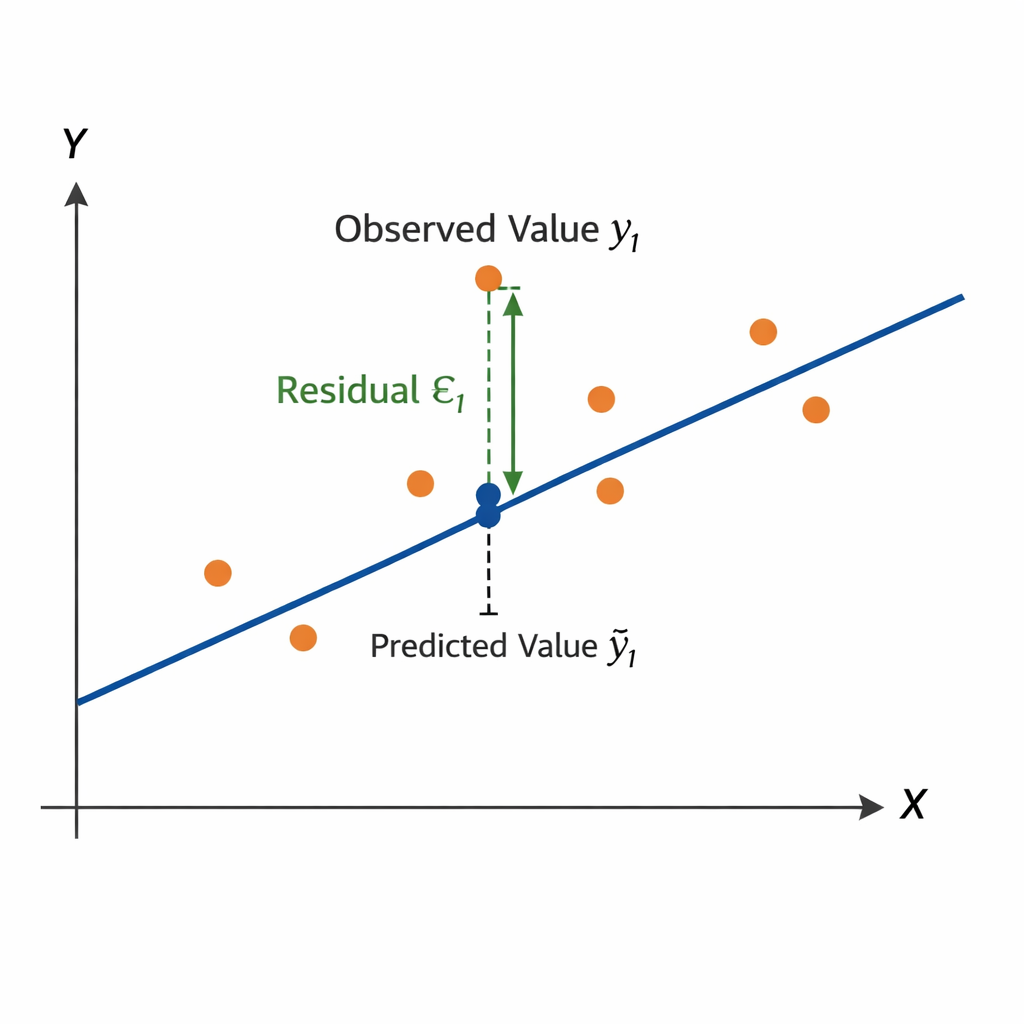
OLS is a linear approach for predicting a quantitative response \((Y)\) based on a set of predictor variables \(X_j\).
\[ y_i = \beta_0 + \beta_1 x_{1,i} + \beta_2 x_{2,i} + \dots + \beta_p x_{p,i} + \epsilon_i \]
or in vector form
\[ y_i = \beta_0 + \beta' x_i + \epsilon_i \]
The optimal regression line minimizes the Residual Sum of Squares (RSS):
\[ RSS = \sum_{i=1}^{n} \epsilon_i^2 = \sum_{i=1}^{n} (y_i - \hat{y}_i)^2 = \sum_{i=1}^{n} (y_i - \beta_0 - \beta' x_i)^2 \]
\[ y = X\beta + \epsilon \]
where
\[ y = \begin{bmatrix} Y_1 \\ Y_2 \\ \vdots \\ Y_n \end{bmatrix} \quad X = \begin{bmatrix} 1 & x_{1,1} & \dots & x_{m,1} \\ 1 & x_{1,2} & \dots & x_{m,2} \\ \vdots & \vdots & \ddots & \vdots \\ 1 & x_{1,n} & \dots & x_{m,n} \end{bmatrix} \]
Closed-form solution
The parameter vector can be estimated by
\[ \beta = (X'X)^{-1}X'y \]
Learning focus
Aim to understand and explain the OLS procedure. You are not required to memorize the formulas for RSS or the closed-form OLS solution.
Intercept: 180,921

Predictor        Coefficient
squarefoot        110.85
Overall.Qual   28,567.43

R^2: 0.56After estimating a regression model, we need to evaluate whether it is useful and reliable.
Evaluation focuses on three complementary questions:
Can we trust the model?
→ Are the underlying assumptions reasonably satisfied?
How well does the model perform?
→ Does it explain variation and make accurate predictions?
What do the coefficients tell us?
→ Are the estimated relationships meaningful and relevant?
Regression models rely on the following assumptions:
After fitting a model, we can evaluate whether these assumptions are reasonable. Different violations affect different aspects of the model (interpretation, uncertainty, prediction).
| Assumption violated | Coefficients (interpretation) | Confidence intervals / p-values (uncertainty) | Prediction (performance) |
|---|---|---|---|
| Linearity | ❌ biased | ❌ invalid | ⚠️ worse |
| Independence | ✅ OK | ❌ too optimistic | ⚠️ context-dependent |
| Homoscedasticity | ✅ OK | ❌ incorrect SEs | ✅ mostly OK |
| Normality | ✅ OK | ⚠️ small-sample issue | ✅ OK |
A common measure to assess the performance of a regression model is \(R^2\) (the coefficient of determination):
\[ R^2 = 1 - \frac{RSS}{TSS} \]
Measures the share of variance in the target variable explained by the model
Example: (\(R^2\) = 0.56) means the model explains 56% of the variation in house prices
Values range from 0 to 1, with higher \(R^2\) generally indicating a better fit
But a high \(R^2\) does not automatically mean the model is useful in practice. The \(R^2\) says little about:
Other evaluation measures
MAE (Mean Absolute Error) Average absolute prediction error → easy to interpret in the unit of the target variable
RMSE (Root Mean Squared Error) Penalizes large errors more strongly → useful when large mistakes are especially costly
Regression coefficients tell us how the predicted outcome changes when a predictor changes, holding the other predictors constant.
For a coefficient \(\beta_j\):
Sign Positive: higher \(x_j\) is associated with higher predicted price Negative: higher \(x_j\) is associated with lower predicted price
Magnitude Indicates the expected change in the target variable for a one-unit increase in \(x_j\)
Example:
\(\beta_\text{squarefoot}\) = 110.85 → one additional square foot is associated with about +$110.85 in predicted price
\(\beta_{\text{Overall.Qual}}\) = 28,567.43 → one additional quality point is associated with about +$28,567 in predicted price
When evaluating coefficients, consider both:
1. Statistical significance
2. Practical significance
Once we move beyond a simple regression model, practical follow-up questions arise:
How can we use categorical predictors?
→ See next slides.
Which predictors should we include?
→ Approaches such as forward selection and backward selection help identify a useful subset of variables
→ Forward selection starts with a very simple model and adds predictors step by step if they improve the model
→ Backward selection starts with a model containing many predictors and removes the least useful ones step by step
Why not include all available variables?
→ Adding too many predictors can create problems such as:
Takeaway
A good regression model is usually not the one with the most variables, but the one that achieves a good balance between interpretability, stability, and predictive performance.
Regression models require numerical input.
But real-world datasets often include categorical variables, for example:
Question:
How can we include such variables in a regression model for performance?
We could assign numbers:
Finance = 1, Healthcare = 2, Retail = 3Problem:
Regression model:
\[\text{performance}_i = \beta_0 + \beta_1 \cdot \text{Industry}_i + \varepsilon_i\]
Encoding:
\[\text{Finance}=1,\ \text{Healthcare}=2,\ \text{Retail}=3\]
Implications
Key issue
Categorical variables have no natural order or distance, but the model treats them as equally spaced numeric values. We must avoid introducing false relationships.
Create one binary column per category (1: category present, 0: category not present).
Example transformation:
Original data
| Industry | Performance |
|---|---|
| Finance | 120 |
| Retail | 95 |
| Healthcare | 140 |
After one-hot encoding
| Performance | Retail | Healthcare |
|---|---|---|
| 120 | 0 | 0 |
| 95 | 1 | 0 |
| 140 | 0 | 1 |
Advantages
One-hot encoding allows categorical variables to be used in linear regression models.
Assume the following regression model:
\[\text{Performance}_i = 100 + 20 \cdot \text{Retail}_i + 40 \cdot \text{Healthcare}_i + \varepsilon_i\]
Interpretation (reference: Finance)
Key idea
Coefficients measure differences relative to the reference category.
Once a regression model has been estimated and evaluated, it can be deployed to support decisions in practice.
Typical uses include:
Describe Identify which factors are associated with higher or lower prices
Predict Estimate the expected price for a new house based on its characteristics
Prescribe Use predictions as input for action, for example:
Key idea
A regression model does not only help us understand the data. It can also be embedded in workflows to support future decisions.
Suppose our fitted model is:
\[ \widehat{\text{price}} = 180{,}921 + 110.85 \cdot \text{squarefoot} + 28{,}567.43 \cdot \text{Overall.Qual} \]
For a house with:
squarefoot = 1500Overall.Qual = 7the predicted price is:
\[ \widehat{\text{price}} = 180{,}921 + 110.85 \cdot 1500 + 28{,}567.43 \cdot 7 \]
\[ \widehat{\text{price}} \approx 547{,}150 \]
A fitted model can be saved and loaded for later use.
import joblib

# Save trained model
joblib.dump(model, "house_price_model.joblib")

# Load trained model later
loaded_model = joblib.load("house_price_model.joblib")

# New data for prediction
new_house = pd.DataFrame([{
    "squarefoot": 1500,
    "Overall.Qual": 7
}])

predicted_price = loaded_model.predict(new_house)
Why save the model?
Saving a model makes it possible to reuse it in applications, dashboards, scripts, or decision-support systems without fitting it again each time.
Before using a regression model in practice, we should ask:
Does it generalize? Does it still perform well on new data?
Is it robust? Are predictions stable when conditions change?
Is it interpretable? Can decision makers understand how outputs are generated?
Is it used responsibly? Could predictions reinforce bias or lead to unfair decisions?
Takeaway
Deployment is not the end of the analytics process. Models should be monitored, reviewed, and updated as data, environments, and decision needs change.
An algorithm is a procedure or set of steps or rules to accomplish a task. It is usually the implementation of a method. Algorithms are used to build models.
In the given context, a model is the description of the relationship between variables. It is used to create output data from given input data, for example to make predictions.
A predictor is a variable used as an input to a model to explain or predict an outcome. Synonyms include: Independent variable (IV); explanatory variable; regressor (econometrics); feature (machine learning); input variable; covariate (statistics, esp. causal inference); control variable (when included to adjust for effects); factor (sometimes, esp. experimental settings); attribute (data mining).
An outcome refers to the variable a model aims to explain or predict based on the predictors. Synonyms include: Dependent variable (DV); response variable; target; label (classification); explained variable; criterion variable; output variable.
Fitting a model means that you estimate the model using the observed data. You are using your data as evidence to help approximate the real-world mathematical process that generated the data. Fitting the model often involves optimization methods and algorithms, such as maximum likelihood estimation, to help get the parameters.
Overfitting arises when a model has learned sample-specific patterns (including noise) rather than the true data-generating process, leading to low out-of-sample predictive performance.
Regression is a core example of a structured, model-based analytics process: from business question to data, modeling, evaluation, and potential deployment.
Linear regression models quantify relationships between variables through coefficients, estimated via optimization (OLS). Coefficients capture marginal effects (numeric variables) and differences relative to a reference category (categorical variables using one-hot encoding).
In practice, the analytics workflow can be implemented in Python: define a model, fit it to data, generate predictions, and evaluate performance — a pattern that extends to many other modeling approaches.
Please complete the survey before you leave today — thank you 🙏